ka72 account linking with Garmin Connect

25 days ago
Reply
Register to post, see what you've read, and subscribe to topics.
Dylan72
Dylan72
QLD
720 posts
QLD, 720 posts
2 Nov 2026 11:20am
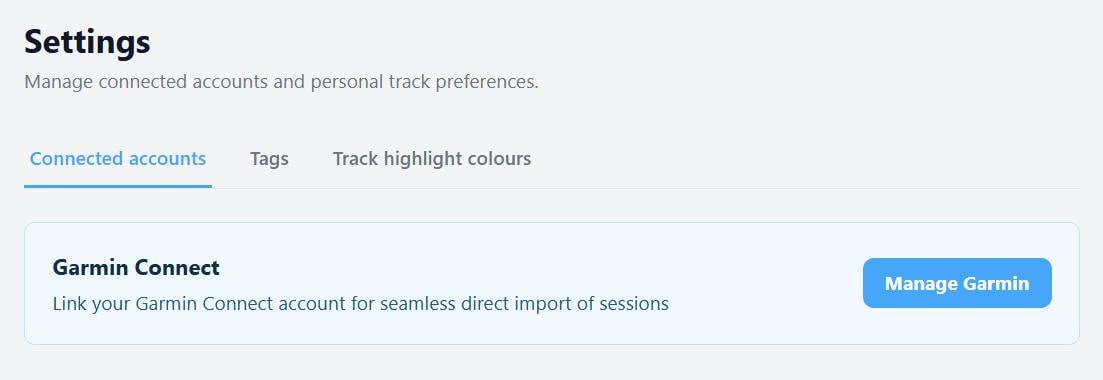
You can now link your ka72 account to a Garmin Connect account.

This will allow Garmin Connect to post your files direct to ka72 as soon as your session hits the cloud.

The linking is available to all registered users on the site (free and pro.) To set up your account link go to ka72.com/me/settings

Once it is set up, you can also use this page to limit the types of tracks that get posted to ka72.

How it works:
Sail with your watch as normal. When you are finished and save your session on the watch, after a while your device will typically pop up a message saying something like "Your activity is now ready to view"

Soon after this, open up ka72.com and you will see a banner at the top of the page advising you that your track has landed.

Open the link, check the track type and visibility, and hit post.

No more downloading/uploading. No more messing with zip files.

The integration is a work in progress. Please let me know if you hit any snags, or have any questions or suggestions for improvements.

OmarShamgar
OmarShamgar
NSW
137 posts
NSW, 137 posts
2 Nov 2026 12:53pm
That's clever and will save a lot of mucking around.

I can see the connected accounts button with nothing beneath it, nothing happens when I press the button in Chrome on Android.
decrepit
decrepit
WA
12938 posts
WA, 12938 posts
2 Nov 2026 12:13pm
Fantastic Dylan, you sure are doing some great work!!!!
Dylan72
Dylan72
QLD
720 posts
QLD, 720 posts
2 Nov 2026 2:58pm
OmarShamgar said..
That's clever and will save a lot of mucking around.

I can see the connected accounts button with nothing beneath it, nothing happens when I press the button in Chrome on Android.


Try refreshing the screen (ctrl-F5). You could have an old frontend cached.

This is what it should look like:


OmarShamgar
OmarShamgar
NSW
137 posts
NSW, 137 posts
2 Nov 2026 4:30pm
Must have been the case, I reloaded the page on Android and all was good.
SeanV
SeanV
QLD
7 posts
QLD, 7 posts
3 Nov 2026 6:55pm
Thanks very much Dylan, makes things so much easier
vosadrian
vosadrian
NSW
477 posts
NSW, 477 posts
4 Nov 2026 9:35am
Awesome work Dylan!

I have been using something similar with Strava (cycling/running/sailing) for some time and was hoping it would arrive to a work flow for windsurfing pushed to GPSTC. Sounds like it is basically there which is great!

Is there any intention to make the data arrive at GPSTC totally touch free at any time? Sounds like you have to login to KA72 and instruct it to post to GPSTC at the current time. Makes sense to have some way to avoid sessions being accidentaly incorrectly posted.

Also, quick question. I use the GPSTC datafield in the recommended way on a garmin 965 which I believe is for "Other" activity. I have just set up KA72 with that activity type to be imported. I don;t use "other" for anything else, so I presume that is correct for this common use case?
tbwonder
tbwonder
NSW
766 posts
NSW, 766 posts
4 Nov 2026 10:35am
Vosadrian,
There is no intention to have automatic posting to GPSTC. It is important that users review their tracks in KA72 before posting to GPSTC.
Yes if using my datafields in the recommended way then set the KA72 import to "Other". This is working for me.
mathew
mathew
QLD
2211 posts
QLD, 2211 posts
4 Nov 2026 1:01pm
tbwonder said..
Vosadrian,
There is no intention to have automatic posting to GPSTC. It is important that users review their tracks in KA72 before posting to GPSTC.
Yes if using my datafields in the recommended way then set the KA72 import to "Other". This is working for me.


Also possible to edit the track (once saved to the phone) to change the category from "other" to "windsurfing".
vosadrian
vosadrian
NSW
477 posts
NSW, 477 posts
4 Nov 2026 2:38pm
mathew said..


tbwonder said..
Vosadrian,
There is no intention to have automatic posting to GPSTC. It is important that users review their tracks in KA72 before posting to GPSTC.
Yes if using my datafields in the recommended way then set the KA72 import to "Other". This is working for me.


Also possible to edit the track (once saved to the phone) to change the category from "other" to "windsurfing".


Can you change the activity on the phone before the push from garmin connect to KA72 occurs? In my experience with Strava, garmin pushes it to Strava very quickly (within 30 seconds of when I sync a new activity from watch to phone). I suspect the push would happen before you could change the activity category.

I expected that step to review would be required in KA72 which makes sense. This still saves most of the steps I had to do in the past with using a PC to download the file and unzip and manually upload to KA72. Should be much easier now. Thanks for the efforts of all involved!
tbwonder
tbwonder
NSW
766 posts
NSW, 766 posts
4 Nov 2026 2:47pm
Yes, the 'Activity type' in Garmin is not related to the 'track type' in KA72.

My Datafields recommended set up uses the Garmin Activity type of 'Other' for Windsurfing, Windfoiling and winging. At this stage you need to manually set the KA72 track type.

Do not attempt to modify the Activity type in Garmin, you will lose some of the metadata related to the file
Dylan72
Dylan72
QLD
720 posts
QLD, 720 posts
5 Nov 2026 10:23am
The implementation right now is, let's say, version 1.0

There has to be a manual review step prior to importing a file, so that users verify the track type on the way into the system. Different track types have slightly different rules around result calculations, so the final results are avaialble until the track type has been determined.

I may be able to infer the track type from some other data in the file, but that depends on what tooling you are using inside your watch to record the sessions. I haven't done that work yet.

The intended flow is:
1. Sail
2. End session on watch
3. Go to ka72 after your watch has synched and verify the track type and import
4. Add session notes in ka72 then Post to GPSTC
5. In GPSTC do whatever else you want (add a photo etc.)

There is similar account linking ready to go in the new GPSTC website that will make the posting even smoother, but that's not going live until the beta site becomes the main site.
dachopper
dachopper
WA
1829 posts
WA, 1829 posts
5 Nov 2026 10:52pm
Dylan72 said..
You can now link your ka72 account to a Garmin Connect account.

This will allow Garmin Connect to post your files direct to ka72 as soon as your session hits the cloud.

The linking is available to all registered users on the site (free and pro.) To set up your account link go to ka72.com/me/settings

Once it is set up, you can also use this page to limit the types of tracks that get posted to ka72.

How it works:
Sail with your watch as normal. When you are finished and save your session on the watch, after a while your device will typically pop up a message saying something like "Your activity is now ready to view"

Soon after this, open up ka72.com and you will see a banner at the top of the page advising you that your track has landed.

Open the link, check the track type and visibility, and hit post.

No more downloading/uploading. No more messing with zip files.

The integration is a work in progress. Please let me know if you hit any snags, or have any questions or suggestions for improvements.

Great work Dylan !


tonyk
tonyk
QLD
632 posts
QLD, 632 posts
6 Nov 2026 1:56pm
Brilliant 🙏
Lake Mac Robbo
Lake Mac Robbo
NSW
26 posts
NSW, 26 posts
9 Nov 2026 7:52am
Thank you very much Dylan, this works brilliantly and makes the process much simpler for me. Cheers Robbo
mikey100
mikey100
QLD
1123 posts
QLD, 1123 posts
14 Nov 2026 6:57am
Now I’m happy to admit that I’m probably the least technologically talented sailor using a GPS, but this upgrade in posting to KA72 is so easy.
One thing I noticed:- when posting by the previous way, my track details also included the green line showing the gps data quality whereas when posting via this shortcut method, that green line graph does not show.
No issue, just an observation.
Dylan72
Dylan72
QLD
720 posts
QLD, 720 posts
15 Nov 2026 6:53am
mikey100 said..
Now I’m happy to admit that I’m probably the least technologically talented sailor using a GPS, but this upgrade in posting to KA72 is so easy.
One thing I noticed:- when posting by the previous way, my track details also included the green line showing the gps data quality whereas when posting via this shortcut method, that green line graph does not show.
No issue, just an observation.


I had a look at this this morning, and the tl;dr is that when Garmin Connect pushes the fit file to ka72.com, it strips out the information that is used to generate this bar (along with a bunch of other stuff that is considered proprietary or noise.) It's all still there in the original .fit file you can download from the site and upload manually. It's just not provided in the pushed file that lands direct from Garmin.

There is already a bit of annoyance on various forums regarding this from other app developers. See e.g. forum.intervals.icu/t/garmin-fit-fields-not-coming-in-possible-garmin-is-filtering-data-prior-to-sending-to-intervals-icu/124287?u=andreas_schnederle-w
It's not clear if Garmin will ever supply this info for direct posts like this. The moment they do, the bar will come back.

What it means for ka72.com users? Probably nothing. If your bar was always green in the past it will likely be always green in the future.

If you are posting tracks on to gpstc, there may be occasions where this data becomes relevant, and you may be asked to provide the original file from Garmin Connect instead of the pushed one for deeper analysis of a specific result.

The actual GPS data is unaffected as far as I can tell. But what we lose is the record of exactly how accurate your GPS settings were at any given time.

I do feel for professional cyclists who are affected by a whole range of data that Garmin appears to have decided to arbitrarily strip from the original file and they depend on.

See also: forums.garmin.com/developer/fit-sdk/f/discussion/432872/discrepancies-between-fit-files-from-garmin-connect-and-api-api-downgraded/


Dylan72
Dylan72
QLD
720 posts
QLD, 720 posts
15 Nov 2026 8:59am
If you do happen to want or need the gps accuracy data on your ka72.com track, and it's already been imported directly from Garmin, you can now re-upload the zip file (the old fashioned way) and your existing track will be connected to the new file, the GPS bar will be back, and all your old notes/comments/tags will remain on the track.
AUS02
AUS02
TAS
2059 posts
TAS, 2059 posts
15 Nov 2026 4:52pm
Great work with all of this Dylan. 👍
dachopper
dachopper
WA
1829 posts
WA, 1829 posts
15 Nov 2026 10:31pm
Dylan72 said..

mikey100 said..
Now I’m happy to admit that I’m probably the least technologically talented sailor using a GPS, but this upgrade in posting to KA72 is so easy.
One thing I noticed:- when posting by the previous way, my track details also included the green line showing the gps data quality whereas when posting via this shortcut method, that green line graph does not show.
No issue, just an observation.


I had a look at this this morning, and the tl;dr is that when Garmin Connect pushes the fit file to ka72.com, it strips out the information that is used to generate this bar (along with a bunch of other stuff that is considered proprietary or noise.) It's all still there in the original .fit file you can download from the site and upload manually. It's just not provided in the pushed file that lands direct from Garmin.

There is already a bit of annoyance on various forums regarding this from other app developers. See e.g. forum.intervals.icu/t/garmin-fit-fields-not-coming-in-possible-garmin-is-filtering-data-prior-to-sending-to-intervals-icu/124287?u=andreas_schnederle-w
It's not clear if Garmin will ever supply this info for direct posts like this. The moment they do, the bar will come back.

What it means for ka72.com users? Probably nothing. If your bar was always green in the past it will likely be always green in the future.

If you are posting tracks on to gpstc, there may be occasions where this data becomes relevant, and you may be asked to provide the original file from Garmin Connect instead of the pushed one for deeper analysis of a specific result.

The actual GPS data is unaffected as far as I can tell. But what we lose is the record of exactly how accurate your GPS settings were at any given time.

I do feel for professional cyclists who are affected by a whole range of data that Garmin appears to have decided to arbitrarily strip from the original file and they depend on.

See also: forums.garmin.com/developer/fit-sdk/f/discussion/432872/discrepancies-between-fit-files-from-garmin-connect-and-api-api-downgraded/


Question,

Is the green bar indicative of the position.getInfo() .accuracy field reading 0 to 4 ?

tbwonder
tbwonder
NSW
766 posts
NSW, 766 posts
16 Nov 2026 8:01am

Question,

Is the green bar indicative of the position.getInfo() .accuracy field reading 0 to 4 ?


No. The green bar represents the GPS mode set in the watch. Should be set to "All + Multiband"
Please Register, or first...
Topics Subscribe Reply