Showing your track and speed

> 10 years ago
Reply
Register to post, see what you've read, and subscribe to topics.
foamballer
foamballer
NSW
406 posts
NSW, 406 posts
22 Oct 2013 10:32pm
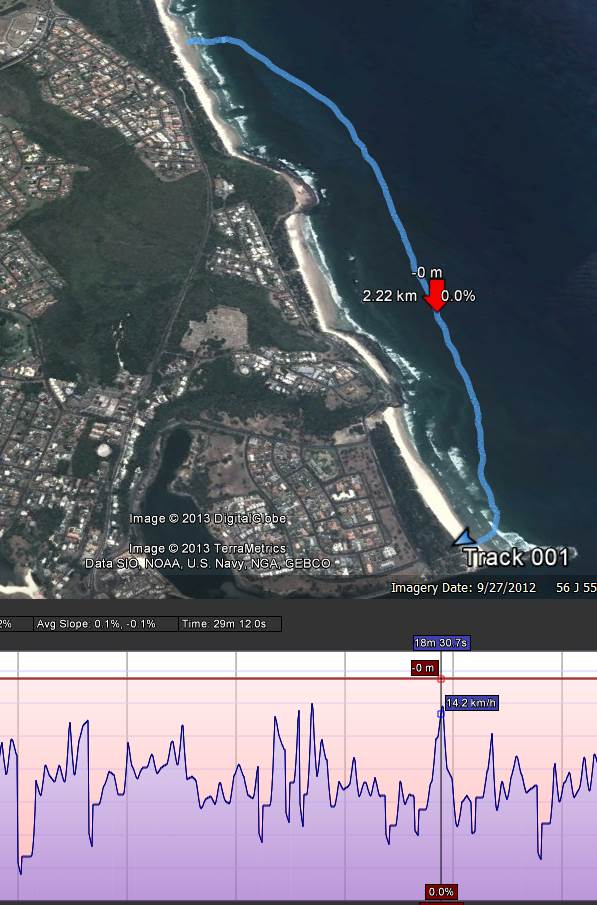
I was playing around with the motion-x app today with the iphone and google earth and found it was possible to get a pretty good view of your instantaneous speed as well as track...

Some of you probably do this all the time, but it was a new one for me. If you don't know how, here's the steps (on a windows computer, mac is probably similar):

On your iphone:
- startup motion-x and start recording a track
- when finished, save track and 'share' it to your email address
On your computer:
- open your email message that motion-x sends
- click view on map link
- a web page will open with your track
- click the download GPX button and save the file somewhere
- Open up google earth
- click file/open then change the filetype to GPS and find your file
- this should then show the track in google earth.
- on the left hand side you should see the name of your track ("GPS Device")
- right click it and 'show elevation profile'
- a time-slider will appear that you can move from start to finish and show speed/altitude/dist travelled etc.

Seems like a lot of steps, but it's a quick and easy way to view your track. The screenshot is from today's short and lazy downwinder... better winds forecast for tomorrow



Bleachy
Bleachy
SA
80 posts
SA, 80 posts
22 Oct 2013 10:37pm
I find if you can take your iPhone with you then using an app like "MapMyRun" or "strava" work really well and can give you a lot better info. I use MapMyRun and it gives distance, time, pace, speed and even custom split times. I also have a heart rate monitor connected so I can see all of that detail after my workouts. You can download it for free which works really well or get an upgraded version at extra cost, very worth it if you like getting all of that info.
nosaj27
nosaj27
QLD
271 posts
QLD, 271 posts
23 Oct 2013 8:00am
Bleachy said..

I find if you can take your iPhone with you then using an app like "MapMyRun" or "strava" work really well and can give you a lot better info. I use MapMyRun and it gives distance, time, pace, speed and even custom split times. I also have a heart rate monitor connected so I can see all of that detail after my workouts. You can download it for free which works really well or get an upgraded version at extra cost, very worth it if you like getting all of that info.


Motion X, can do all that also including HR if you have a compatible HR monitor strap. It also has a large number of activities including SUP, which last time I looked MapMyFitness didn't have.
nosaj27
nosaj27
QLD
271 posts
QLD, 271 posts
23 Oct 2013 8:04am
Forgot to add that Motion X has the ability to send your co-ordinates (via email, Facebook or Twitter) at regular intervals which is a great safety aspect for solo paddles.
foamballer
foamballer
NSW
406 posts
NSW, 406 posts
23 Oct 2013 10:45am
Bleachy - thanks, I've downloaded mapmyrun and will compare. I agree, there's lots of products out there that will do similar.
Nosaj - I use liveupdates too. Virtually all my long paddles are solo.
Bleachy
Bleachy
SA
80 posts
SA, 80 posts
23 Oct 2013 9:37pm
Hi, I've been using mapmyrun for a long time, before i started paddling so I just stick to what I know and wanted to share. It does annoy me a bit that it doesnt have SUP on there as an activity so I just put in paddle. Which, from using other HR monitors, seems to be underestimating my caloric expenditure but really im just after speed, pace, and split times with HR. I might have a look at motion x but mapmyrun is very easy to use which is always a big bonus for me its probably more familiarity. Also, if anyones interested, I have just purchased a strapless heart rate monitor called a Mio Alpha. Only had it 2 weeks now but working really well so far. Also I think mapmyrun has live updates, not that I want to turn this into a competition haha. I would be happy to hear of any other similar apps.

gregc
gregc
VIC
1299 posts
VIC, 1299 posts
23 Oct 2013 10:29pm
Isnt the tech just awesome these days, it would have been less than 10 years ago that you just couldn't have got any of this information without shelling out huge amounts of money and the actual device would have needed a back pack. Then with all the waterproof kit you can get to lock your smart phone away its brilliant. The only thing I found with Motion X was that it just couldn't find enough satellites when I was out paddling. I ended up getting a Garmin watch and they are just brilliant, plus you get the whole Garmin Connect site which is bloody brilliant as well.
nosaj27
nosaj27
QLD
271 posts
QLD, 271 posts
24 Oct 2013 6:26am
gregc said..

Isnt the tech just awesome these days, it would have been less than 10 years ago that you just couldn't have got any of this information without shelling out huge amounts of money and the actual device would have needed a back pack. Then with all the waterproof kit you can get to lock your smart phone away its brilliant. The only thing I found with Motion X was that it just couldn't find enough satellites when I was out paddling. I ended up getting a Garmin watch and they are just brilliant, plus you get the whole Garmin Connect site which is bloody brilliant as well.


I have noticed a similar thing with MotionX also about the satellites, but only seems to happen when I first start it. May be worthwhile getting it running and settled for a few minutes before setting off. I wonder if it is something to do with the app or the iPhone itself, because as great as the iPhone is it is trying to be all things to everyone so thermay be some compromises with functionality; whereas a GPS watch really is focused on the GPS with the time etc a secondary function.
Please Register, or first...
Topics Subscribe Reply

Return To Classic site 😭
Or... let us know if a problem, so we can tweak! 😅