GoPro wifi backpacks

> 10 years ago
Reply
Register to post, see what you've read, and subscribe to topics.
FOT
FOT
WA
101 posts
FOT FOT
WA, 101 posts
5 Sep 2012 12:26am
For those of you that have been waiting for the GoPro wifi backpack kits - Camzilla.com.au (NSW retailer) have stock and are selling them at $139 (i think thats a little below rrp?)

Ive been looking locally for a while and there has notbeen any stock. These guys were great, ordered Sunday night, shipped Monday and arrived tuesday well packed in an express post bag.

Their other gopro's and accessories are also a few $$ off rrp, so worth a visit if you're in the market.

(note- I'm not affiliated with Camzilla.com.au - just a satisfied customer)
DavidJohn
DavidJohn
VIC
17570 posts
VIC, 17570 posts
5 Sep 2012 4:42am
I've had one for a while now.. and it would be great if I could get it working.. I've given up now after a couple of try's ending in utter frusttion.. I will try again one day soon.

Why do GoPro have to make simple things so hard with all their updates needed and the camera menu system.. and maybe one day they will get that wifi app up and going to work with it.

DJ
TomW059
TomW059
183 posts
183 posts
5 Sep 2012 3:56am
Sony has shown new wide angle sports cam with integrated wifi, smartphone control, allows
live streaming via smartphone, stream to smartphone for storage. has all the attachment and waterproof case. smaller than gopro.

I work for Sony Mobile Communications (smartphones) and saw it at IFA consumer electronics show in Berlin last week. don't know exactly it will hit shelves or cost. But I will buy one for own money....
Piros
Piros
QLD
7296 posts
OG SUP
OG SUP
VIC
3516 posts
VIC, 3516 posts
5 Sep 2012 9:28am
DJ I couldnt agree more,

tossed it in the corner in sheer frustration and there it has stayed!

Phill

DavidJohn said...

I've had one for a while now.. and it would be great if I could get it working.. I've given up now after a couple of try's ending in utter frusttion.. I will try again one day soon.

Why do GoPro have to make simple things so hard with all their updates needed and the camera menu system.. and maybe one day they will get that wifi app up and going to work with it.
Good question
DJ


Rhys McClintock
Rhys McClintock
NSW
995 posts
NSW, 995 posts
5 Sep 2012 10:29am
Same here... What a nightmare...
hilly
hilly
WA
8120 posts
WA, 8120 posts
5 Sep 2012 8:35am
DavidJohn said...


Why do GoPro have to make simple things so hard with all their updates needed and the camera menu system..
DJ


Maybe they don't like Gopro footage either
SHQ
SHQ
VIC
322 posts
SHQ SHQ
VIC, 322 posts
5 Sep 2012 11:17am
I have set up a few backpac's now and understand the challenges. Bring them into SHQ and Dustin can help you out.
SP
SP
10982 posts
SP SP
10982 posts
5 Sep 2012 11:11am
Saw these yesterday in a surf mag... Good thing is they have a screen on the back.

http://www.optex.com.au/product/gocam/
TomW059
TomW059
183 posts
183 posts
6 Sep 2012 3:35am


wow. the marketing is so bad that I didn't even know this....did it get released in Australia ?
will look for one.
gregc
gregc
VIC
1299 posts
VIC, 1299 posts
6 Sep 2012 10:31pm
DJ a mate of mine on the windsurfing forum (jh2703) is a go pro fiend he has been using the wifi backpac for a hie now and swears by it, not at it :). Im sure he would be more than stoked to exchange hints with you
DavidJohn
DavidJohn
VIC
17570 posts
VIC, 17570 posts
6 Sep 2012 10:58pm
gregc said...

DJ a mate of mine on the windsurfing forum (jh2703) is a go pro fiend he has been using the wifi backpac for a hie now and swears by it, not at it :). Im sure he would be more than stoked to exchange hints with you


Thanks.. If I can't get it working I will get back to you for his info.. I'm sure it's just me.. My main problem is that I now have an iMac and don't know ow to use it.. I don't know why you can't just take it out of the box and turn it on.. and it will work.. To make it work you first have to update the camera.. Then do an update on the back pac.. Then do an update on the wist remote.. Then get them to talk to each other by going through a zillion settings that have so many different options.. and then if you get all these things right.. and the planets are aligned .. It will work.. No probs..

DJ
PTWoody
PTWoody
VIC
3982 posts
VIC, 3982 posts
6 Sep 2012 11:21pm
This problem is not unique to anyone. It's a global issue. GoPro has stuffed up with this one. I can understand why the cameras need a firmware update to run the wifi backpack as they were made and released well before the backpack had been developed. However, there is no way that the backpack and the remote should need firmware updates straight after they left the factory. It's madness. I've managed to update the camera and the backpack but the process crashes for me in attempting to update the remote and sync the components.

GoPro - get stuffed!
2KiteBurra
2KiteBurra
NSW
56 posts
NSW, 56 posts
8 Sep 2012 7:59pm
DavidJohn said...

gregc said...

DJ a mate of mine on the windsurfing forum (jh2703) is a go pro fiend he has been using the wifi backpac for a hie now and swears by it, not at it :). Im sure he would be more than stoked to exchange hints with you


Thanks.. If I can't get it working I will get back to you for his info.. I'm sure it's just me.. My main problem is that I now have an iMac and don't know ow to use it.. I don't know why you can't just take it out of the box and turn it on.. and it will work.. To make it work you first have to update the camera.. Then do an update on the back pac.. Then do an update on the wist remote.. Then get them to talk to each other by going through a zillion settings that have so many different options.. and then if you get all these things right.. and the planets are aligned .. It will work.. No probs..

DJ


DJ,

The reason we update is because it is a mini computer and to get them to talk this is what we do, same with mobile phones these dayz they require an update straight out of box.

Before you start to up date your camera and wifi back+ remote. you will first have to update your "GoPro CineForm Studio" (the program on your computer) via the following link:

http://gopro.com/software-app/cineform-studio/

now after this restart computer, plug in your gopro (without wifi attached!!!!)
then power it on to enter USB mode. Open the GoPro CineForm Studio and it should tell you your camera needs an update. if it doesnt "pop up" go to "help/Device window" up the top LH corner: your gopro will be here and have a update button to select. press it and Voila!! camera updates.

If you have multiple USB's plug in your WiFi and Remote via two usb's (*remember NOT to connect your Wifi to camera*)
once this is done refresh the "help/Device Window" and they should be there ready to update.

When complete disconnect and plug all together, turn on the Wifi back pac only.
using the remote press power for one sec and camera will turn on, use the function button to scroll though menu etc the your done.. good luck

if all else fails and want to do some reading

gopro.com/support/article/?21646901

note: Any backpac's you get with the gopro should never be together and plugged into computer via two usb's, always seperate them first or you will wreck them. this includes the battery bac pac.

JBFletch
JBFletch
QLD
1287 posts
QLD, 1287 posts
9 Sep 2012 5:31pm
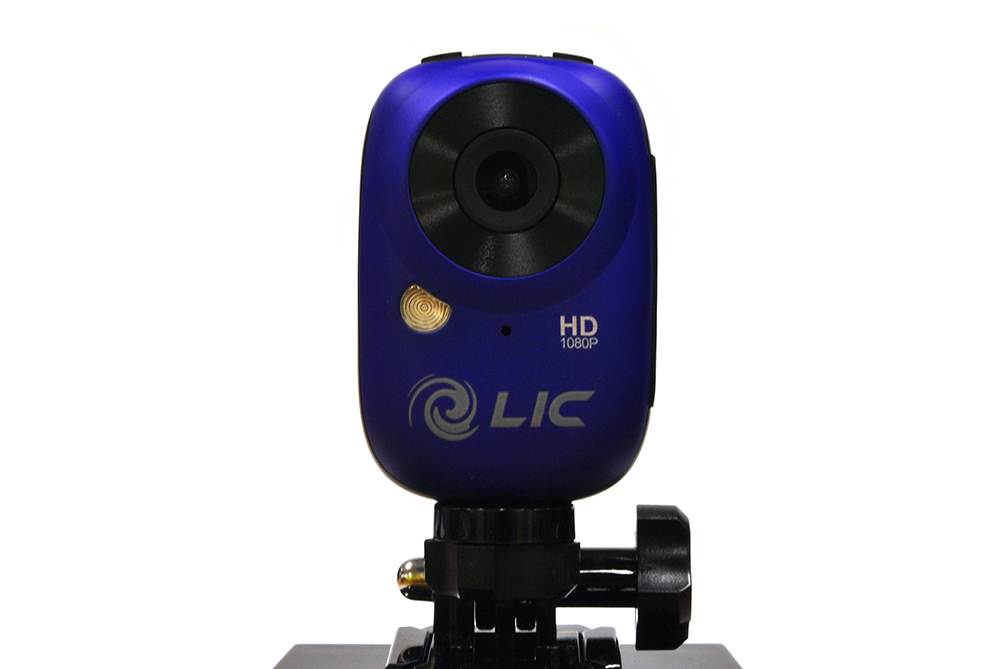
I got a hold of this nifty little gem.

Its 1080HD has built in wireless and is only RRP $219. add a waterproof housing $60 and your still $100 clear of a gopro.

seems to work so far, just need to get my editing skills sorted.


Please Register, or first...
Topics Subscribe Reply

Return To Classic site 😭
Or... let us know if a problem, so we can tweak! 😅