Computers,NFI

> 10 years ago
Reply
Register to post, see what you've read, and subscribe to topics.
DUDE
DUDE
NSW
1132 posts
NSW, 1132 posts
28 Sep 2011 12:14am
I have no idea so in simple terms is this a good buy???

Case:
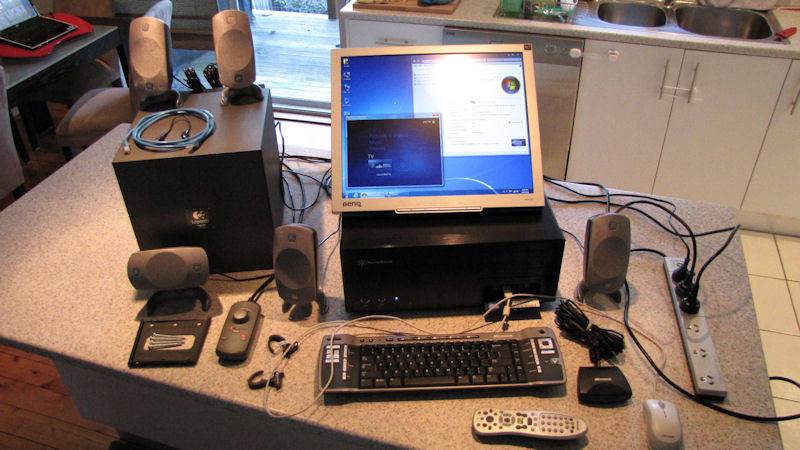
SilverStone LC17 HTPC Case, ATX (Black)

Screen:

1 x BenQ FP91G 19" LCD (4:3 aspect)


OS:
Windows 7 (OEM) - I'm shipping with a legitimate OEM license of Win 7.


Mainboard:
Intel DG41TY Mainboard (microATX (9.60 inches by 8.60 inches)

8 x USB 2.0 ports
1 x serial port header
4 x Serial ATA IDE interfaces
1 x Parallel ATA IDE interface with UDMA 33, ATA-66/100 support
1 x diskette drive interface
2 x PS/2 (keyboard & mouse)
1 x PCIe x 16
2 x PCI


Chipset:
Intel G41 Express Chipset


Processor:
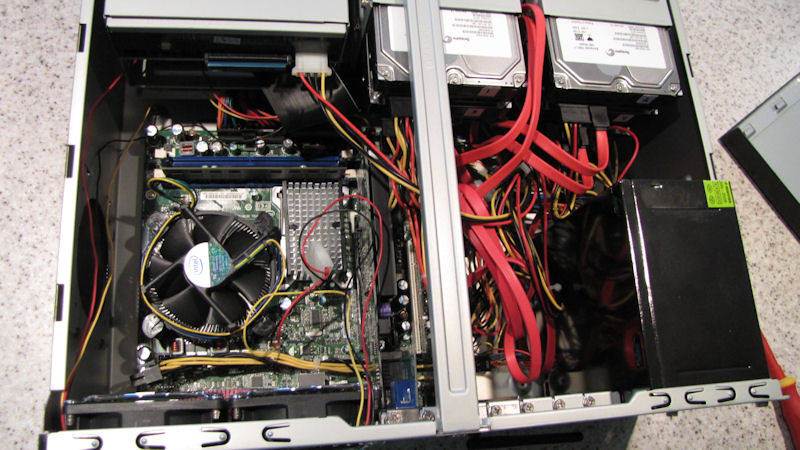
Intel Pentium E5300 (Dual Core, 2.6GHz, 2M L2 Cache, 800MHz FSB)


Memory:
2 GB (DDR2, PC2 6400, 800MHz, 5-6-6, Value Series, OCZ Manufactured Chips)
)


Hard Drives:
1 x 500 GB (Seagate Barracuda 7200.12, SATA2)
This is configurated as a single NTFS partition
with Windows 7 installed on it (C: drive)
4 x 640 GB (Seagate Barracuda 7200.11, SATA2)
These are mounted on an Adaptec Raid Controller (4 port)
in a RAID 1 + 0 configuration - I have it mounted in Windows
as a 1.5 TB NTFS partition for data storage (D: drive)


Audio:
Realtek ALC888VC, On-board, 6-channel, 5.1


Speakders:
Logitech Z 5300 5.1 Surround Sound Speaker System


Video Intel X4500 (On-board, VGA/DVI, Supports HD and Blue Ray playback according to Intel's website)


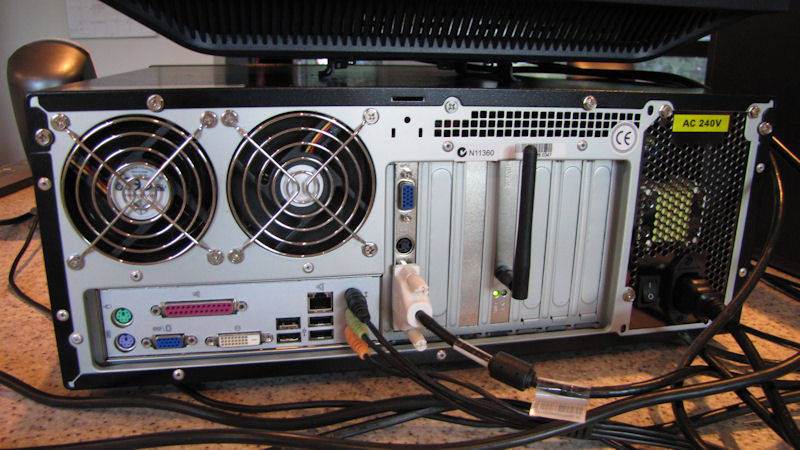
nVida GeForce 7100 (in the PCIe slot, VGA/DVI/TV)

LAN:
Gigabit (Realtek RTL 8111D), On-board


Wifi:
Wireless G (802.11g, 54Mbps), D-Link DWA-510 (in the PCI slot)


Optical Drive:
LG 16x DVD-RW (IDE)


Cooling:
1 x Intel CPU Fan
4 x 80mm Case Fans


Keyboard:
Microsoft Media Centre Keyboard


Remote:
Microsoft Media Centre Remote Control & IR Receiver


Cables (Lots of them):
3 x Power
1 x Power board
1 x TV/SVid
1 x Cat 5e LAN Patch
1 x DVI


???good buy or not
thanks
Mark _australia
Mark _australia
WA
23645 posts
WA, 23645 posts
27 Sep 2011 10:19pm
Looks like it has all the bits
DUDE
DUDE
NSW
1132 posts
NSW, 1132 posts
28 Sep 2011 12:24am


kyteryder
kyteryder
NSW
692 posts
NSW, 692 posts
28 Sep 2011 12:37am
Not than i am an expert , but it is only a good buy, if it does what you want. If you only want to use ms word, and check emails, it seems overkill. But if you want to use it to run a rocket ship into out of space it probably isnt going to cut the mustard. Tell people how and what progams you want to run, may help ingetting a better answer.

KR
WADude
WADude
WA
2 posts
WA, 2 posts
27 Sep 2011 10:42pm
You've not mentioned the price.

But looks like an old shonky piece of second hand crap to me. 19 inch monitor ? 2009 graphics card ? 2 Gb RAM ?

Not mentioned what your would like to use it for either.
If you're getting it for $250, its a maybe.

New good gear with a warranty is pretty cheap these days.
CJW
CJW
NSW
1731 posts
CJW CJW
NSW, 1731 posts
28 Sep 2011 12:45am
Looks like it's second hand, how much is it and as said above what do you want to do with it? In today's terms that's a low end system cpu/ram/gfx spec wise. Bear in mind you could go into JB or HN etc and buy a core i7 laptop for $1000 that will smoke that thing sideways in terms of performance, something to consider.
dirtyharry
dirtyharry
WA
444 posts
WA, 444 posts
27 Sep 2011 10:59pm
It's missing the firewall. I've got one off an old commodore that would pretty much bolt straight onto that rig. $50 ono
FormulaNova
FormulaNova
WA
15100 posts
WA, 15100 posts
28 Sep 2011 5:54am
Based on the specs, I think it has been used as a home theatre/media centre PC. I have something similar, but without the multiple hard drives.

I can tell you that the case cost me $135 (without a power supply) about a week ago.

Given that it has a media centre case, an Nvidia video card with Svideo output, it suggests it has been used as a media centre PC, but I am not sure why they have gone with an Adaptec Raid card, unless they really want to make sure they don't lose any recordings.

As other people have said, what do you want to use it for, and how much is it?
evlPanda
evlPanda
NSW
9207 posts
NSW, 9207 posts
28 Sep 2011 9:21am
Computers, NFI:

saltiest1
saltiest1
NSW
2568 posts
NSW, 2568 posts
28 Sep 2011 9:43am
^^^ that show ****s me to tears
FlySurfer
FlySurfer
NSW
4460 posts
NSW, 4460 posts
28 Sep 2011 11:27am
TBH... no it's not.

For $200 maybe.
It's not even adequate for an HTPC... I recently built one...


Runs silent...
Intel Core i5 2500T.. (hard to find CPU)
GTX 550 Ti
SilverStone SG06
SSD + 3TB HDD
...$600

If you want something a little portable try: http://www.ebay.com.au/itm/150666281630


GPA
GPA
WA
2529 posts
GPA GPA
WA, 2529 posts
28 Sep 2011 10:01am
^^^
Nice Heat Sink!!!
doggie
doggie
WA
15849 posts
WA, 15849 posts
28 Sep 2011 10:04am
GPA said...

^^^
Nice Heat Sink!!!


GPA has computer love
GPA
GPA
WA
2529 posts
GPA GPA
WA, 2529 posts
28 Sep 2011 10:08am
doggie said...

GPA said...

^^^
Nice Heat Sink!!!


GPA has computer love


Nah - I've moved on. Although I was in IT for 23yrs, I left it behind about 5yrs ago and don't miss it... at all.
doggie
doggie
WA
15849 posts
WA, 15849 posts
28 Sep 2011 10:31am
GPA said...

doggie said...

GPA said...

^^^
Nice Heat Sink!!!


GPA has computer love


Nah - I've moved on. Although I was in IT for 23yrs, I left it behind about 5yrs ago and don't miss it... at all.


FlySurfer
FlySurfer
NSW
4460 posts
NSW, 4460 posts
28 Sep 2011 12:52pm
GPA said...

^^^
Nice Heat Sink!!!

I'll show u a nice heat sink... next time I'm going H2O

My main rig...


GPA
GPA
WA
2529 posts
GPA GPA
WA, 2529 posts
28 Sep 2011 11:40am
doggie said...

GPA said...

doggie said...

GPA said...

^^^
Nice Heat Sink!!!


GPA has computer love


Nah - I've moved on. Although I was in IT for 23yrs, I left it behind about 5yrs ago and don't miss it... at all.


Sadly, I know someone who could be that guy! Used to work for me... looked almost identical to him... ah - the Stereotypical IT Nerd...

SomeOtherGuy
SomeOtherGuy
NSW
807 posts
NSW, 807 posts
28 Sep 2011 2:16pm
This seems appropriate at this time

FormulaNova
FormulaNova
WA
15100 posts
WA, 15100 posts
28 Sep 2011 12:33pm
FlySurfer said...

TBH... no it's not.

For $200 maybe.
It's not even adequate for an HTPC... I recently built one...
[<snip>
Runs silent...
Intel Core i5 2500T.. (hard to find CPU)
GTX 550 Ti
SilverStone SG06
SSD + 3TB HDD
...$600

If you want something a little portable try: http://www.ebay.com.au/itm/150666281630


Are you serious? What are you doing with your home theatre PC setup that needs more?

You don't need that much grunt if your video card handles most of the decoding, so why do you need the latest/greatest CPU?

FlySurfer
FlySurfer
NSW
4460 posts
NSW, 4460 posts
28 Sep 2011 4:23pm
FormulaNova said...
Are you serious? What are you doing with your home theatre PC setup that needs more?

You don't need that much grunt if your video card handles most of the decoding, so why do you need the latest/greatest CPU?


LAV Cuvid + MadVR, high bit rate 1080p (specially the 3D Side by Side stuff) will choke anything less than a i3 2300 + GTS 450... my spec. adds a little head room .

Now imagine you want to encode a file while watching another... your covered.
Also High 10 Profile (Hi10P) is CPU only.

BTW: I BIOS underclocked the GPU so as to keep it silent... also had to mod the PSU... I can still hear a very faint capacitor squeal, but compared to the PS3/Xbox it's completely silent.

Mark _australia
Mark _australia
WA
23645 posts
WA, 23645 posts
28 Sep 2011 2:43pm
easier to watch a bl00dy video.

I don't have enought time to watch more than 3hrs a week of telly, don't understand all this gotta have the latest and greatest stuff.

Like all my mates taking the p1ss as i didn't get a HD recorder and used video. now alll their $1000 HD recorders are obsolete and you can plug in a $30 USB stick into the digital TV.
doggie
doggie
WA
15849 posts
WA, 15849 posts
28 Sep 2011 3:04pm
Mark _australia said...

easier to watch a bl00dy video.

I don't have enought time to watch more than 3hrs a week of telly, don't understand all this gotta have the latest and greatest stuff.

Like all my mates taking the p1ss as i didn't get a HD recorder and used video. now alll their $1000 HD recorders are obsolete and you can plug in a $30 USB stick into the digital TV.


keep it simple stupid
FlySurfer
FlySurfer
NSW
4460 posts
NSW, 4460 posts
28 Sep 2011 7:46pm
Mark _australia said...
Like all my mates taking the p1ss as i didn't get a HD recorder and used video. now alll their $1000 HD recorders are obsolete and you can plug in a $30 USB stick into the digital TV.


HD recorders... WTF they recording?

I use XBMC it's free , 200GB/m no TV antenna.


the gibbo
the gibbo
WA
776 posts
WA, 776 posts
28 Sep 2011 8:00pm
DUDE said...

I have no idea so in simple terms is this a good buy???

Case:
SilverStone LC17 HTPC Case, ATX (Black)
Not as good as Brands Hatch
Screen:

1 x BenQ FP91G 19" LCD (4:3 aspect)
Not as good as Ben10


OS:
Windows 7 (OEM) - I'm shipping with a legitimate OEM license of Win 7.
Na, windows n doors is better

Mainboard:
Intel DG41TY Mainboard (microATX (9.60 inches by 8.60 inches)(6.5inches is enuf)

8 x USB 2.0 ports(1 x GSP is enuf)
1 x serial port header(serial killers no good)
4 x Serial ATA IDE interfaces(eh)
1 x Parallel ATA IDE interface with UDMA 33, ATA-66/100 support(parallel has to many l's)
1 x diskette drive interface(smurfette)
2 x PS/2 (keyboard & mouse)(a mouse f//K of your aving a larf)
1 x PCIe x 16
2 x PCI(CSI)


Chipset:
Intel G41 Express Chipset(Ali G)


Processor:
Intel Pentium E5300 (Dual Core, 2.6GHz, 2M L2 Cache, 800MHz FSB)
(pilates good for core)


Memory:
2 GB (DDR2, PC2 6400, 800MHz, 5-6-6, Value Series, OCZ Manufactured Chips)
)
Accept no substitutes, manufactrured chips are S//T, go the potato


Hard Drives:(F off thier soft)
1 x 500 GB (Seagate Barracuda 7200.12, SATA2)
I much prefer the billingsgate cod
This is configurated as a single NTFS partition
with Windows 7 installed on it (C: drive)
4 x 640 GB (Seagate Barracuda 7200.11, SATA2)
These are mounted on an Adaptec Raid Controller (4 port)
in a RAID 1 + 0 configuration - I have it mounted in Windows
as a 1.5 TB NTFS partition for data storage (D: drive)


Audio:
Realtek ALC888VC, On-board, 6-channel, 5.1


Speakders:
Logitech Z 5300 5.1 Surround Sound Speaker System


Video Intel X4500 (On-board, VGA/DVI, Supports HD and Blue Ray playback according to Intel's website)
yeah this is good stingrays are s??t


nVida GeForce 7100 (in the PCIe slot, VGA/DVI/TV)
Watch out for slots

LAN:
Gigabit (Realtek RTL 8111D), On-board
its not real


Wifi:
Wireless G (802.11g, 54Mbps), D-Link DWA-510 (in the PCI slot)
politically correct insemination slot hmmm

Optical Drive:
LG 16x DVD-RW (IDE)


Cooling:
1 x Intel CPU Fan
4 x 80mm Case Fans


Keyboard:
Microsoft Media Centre Keyboard


Remote:
Microsoft Media Centre Remote Control & IR Receiver


Cables (Lots of them):
3 x Power
1 x Power board
1 x TV/SVid
1 x Cat 5e LAN Patch
1 x DVI
Bonus

???good buy or not
thanks


yes f?in great dude
FormulaNova
FormulaNova
WA
15100 posts
WA, 15100 posts
28 Sep 2011 8:05pm
FlySurfer said...

FormulaNova said...
Are you serious? What are you doing with your home theatre PC setup that needs more?

You don't need that much grunt if your video card handles most of the decoding, so why do you need the latest/greatest CPU?


LAV Cuvid + MadVR, high bit rate 1080p (specially the 3D Side by Side stuff) will choke anything less than a i3 2300 + GTS 450... my spec. adds a little head room .

Now imagine you want to encode a file while watching another... your covered.
Also High 10 Profile (Hi10P) is CPU only.

BTW: I BIOS underclocked the GPU so as to keep it silent... also had to mod the PSU... I can still hear a very faint capacitor squeal, but compared to the PS3/Xbox it's completely silent.


You encode video? I just copy it from the airwaves already encoded :)

I spent a bit of time trying to use low power CPUs, quiet video cards and quiet drives. In the end, after all this I bought a few second hand HP DC7700 machines from ebay and they were/are quiet and easily decode HD, and are pretty compact too. If only I had known this in the beginning.

I think the machine I am using now just has an E5300(?) and performs great.

kiteboy dave
kiteboy dave
QLD
6525 posts
QLD, 6525 posts
28 Sep 2011 10:34pm
CJW
CJW
NSW
1731 posts
CJW CJW
NSW, 1731 posts
28 Sep 2011 10:44pm
RE XBMC it's pretty good no doubt, but it still requires a 'media player' be it a PC or whatever concoction you have it installed on. I got over all that stuff, best thing I ever did was go out and buy a Western digital TV-live and a NAS. The NAS just sits silently plugged into my router with a ****load of storage and the WD tv-live is a 10*10*2cm box connected to the tv/network, optical sound, full 1080P output over HDMI, plays anything, even .mkv, subtitles, you name it. You can even plug in a usb key or a portable HD. No more computers running 24/7 or other streaming devices etc...and all for $100 from JB, freaking boss!

Also a word of warning for anyone looking to buy devices that stream/play stuff over a network to a tv. Be very careful, Sony have now starting pimping Cinavia DRM technology pretty hard in their movie releases and no doubt it will spread. I was watching a movie I *cough* rented *cough* a while back, streaming it to my tv via the PS3 and it stopped playing after about 2 min due to copyright violation. So basically no matter what source you get a cinavia DRM movie from, if you play it on a device with Cinavia DRM enabled (ps3 is probably the most well know currently) it won't play. The hook is that Sony who owns the blueray patent will not let companies license blueray for their devices unless their hardware includes ways to implement Cinavia, hence stop you playing illegal stuff.

The technology/idea behind it is genius because you can't currently get rid of it and there are very few work arounds; I was actually very impressed they came up with something so definitive. WD tv-live is immune as it doesn't posses the hardware to do it (one of the reasons I bought it) but HEAPS of the new media streaming devices do have the hardware (some of the WD live models as well) so if you're into *cough* renting *cough* do your research before buying anything.
Toots
Toots
WA
271 posts
WA, 271 posts
28 Sep 2011 8:53pm
I do some heavy 3d graphics and Cad work for a living, I used to be a walking talking toms hardware, but you only need to be happy with the machine you have for a small while before all your info is obsolete.
I built the one I use now using only quality parts, its nearly 4 years old now, hasnt crashed once and runs all the polygons I need, I paid about 2k for it, these days I can triple the specs for less than 1k. Do I need it? not at all.
I troll whirlpool forums these days because people are always upgrading, and selling gear that suits my system, I just got 8 gig of heavy gaming ram for the price of postage.
I dont know whether to laugh or cry but so many people associate fast downloads with computer specs, when most of the time its their craphole connection, not so much these days though, every one has adsl1 at least however the confusion is still there and exploited by the seller
Jr Walks
Jr Walks
WA
284 posts
WA, 284 posts
28 Sep 2011 9:11pm
FlySurfer said...

GPA said...

^^^
Nice Heat Sink!!!

I'll show u a nice heat sink... next time I'm going H2O

My main rig...


Nice D-14 (Not a fan of the noctua Fan colours)
Cross fire 2 GTX560's?

Anyway back on topic.
I personally think its crap, But I graphic render
And TBH the 4x650GB HDD's are total overkill.
Unless you want to run server then buy some more RAM
GPA
GPA
WA
2529 posts
GPA GPA
WA, 2529 posts
28 Sep 2011 9:19pm
CJW said...

RE XBMC it's pretty good no doubt, but it still requires a 'media player' be it a PC or whatever concoction you have it installed on. I got over all that stuff, best thing I ever did was go out and buy a Western digital TV-live and a NAS. The NAS just sits silently plugged into my router with a ****load of storage and the WD tv-live is a 10*10*2cm box connected to the tv/network, optical sound, full 1080P output over HDMI, plays anything, even .mkv, subtitles, you name it. You can even plug in a usb key or a portable HD. No more computers running 24/7 or other streaming devices etc...and all for $100 from JB, freaking boss!


+1 for the Western Digital TV-live lil box... such a great addition to any media centre... good for music and photos also - just plug in a $99 2TB USB HDD and off you go.
FlySurfer
FlySurfer
NSW
4460 posts
NSW, 4460 posts
29 Sep 2011 12:17am
If you want to go down the media box... PopCorn Hour are pretty good... the Mrs got my hand me down.

The WD live is good for the price, but still not capable of high bit rate 1080p; I think it uses the same chipset as the older generation Popcorn hours... I like the flexibility of an HTPC, but setting it up properly with DTS MA, DolbyTrue HD pass through, splitters, demuxers, codecs and all the other things I imagine could be daunting.

I use a Logitech Dinovo mini + Harmony one to control the whole thing.


Please Register, or first...
Topics Subscribe Reply

Return To Classic site 😭
Or... let us know if a problem, so we can tweak! 😅